Kristina Schulz

Updated 2 months ago

Comprehensive Screen Capture Tool for Windows

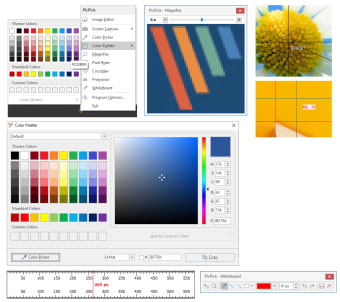
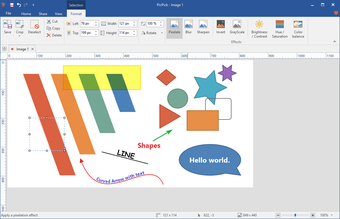
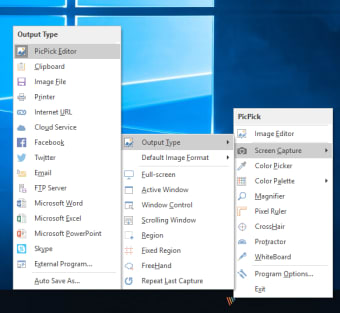
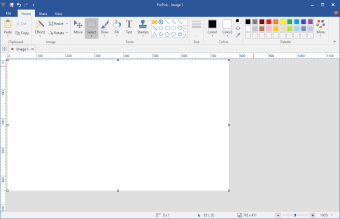
PicPick is a versatile screen capture application designed for Windows users, offering a range of features to enhance productivity. As a free utility, it caters to various screen capture needs, from full-screen captures to region-specific selections. The tool also includes an integrated image editor that allows users to annotate and modify captured images seamlessly, making it ideal for both casual users and professionals. Additionally, PicPick supports a variety of file formats for saving images, ensuring compatibility across different platforms.

Top Recommended Alternative

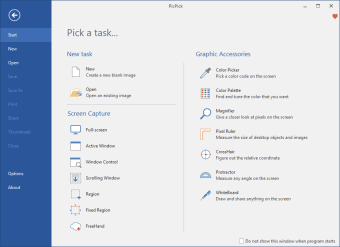
Beyond basic capture functionalities, PicPick offers advanced options such as scrolling window capture, color picking, and a pixel ruler, making it a comprehensive tool for graphic designers and content creators. Its user-friendly interface ensures that even those new to screen capturing can navigate its features with ease. Overall, PicPick stands out as a reliable choice for anyone in need of effective screen capture solutions.


Kristina Schulz

Kristina has professional experience in Europe, the United States, and Asia, specializing in communication and languages. She values adaptability in multicultural settings and brings this perspective to her writing. Her content reflects clarity, cross-cultural awareness, and practical expertise in connecting ideas through language.

 0/5

App specs

Program available in other languages


Icon of program: PicPick

PicPick for PC

  • Free
  • 3.8
    620
  • 562K
  • V7.4.1

User reviews about PicPick

3.8

5 reviews

Add review

Main reviews for you

  • Anonymous user

    I was quite surprised to find all the features in this software. I use the snip feature in Windows daily. This product will save me a lot of time and the quality is just great.

  • Anonymous user

    Very recomended software,but please make for the other system too such as Linux and Mac

  • Anonymous user

    Warning. Warning: carries the somoto malware do not download this version: 3.0.9 do a search online. I have version 3.0.8 installed on my pc. I wanted to upgrade to the latest version but win vista kept giving me warnings about this new version. I almost overrode the warnings but decided to do some further research online. Sure enough, i found out this latest version is infected with malware.I contacted the picpick software company but they have not responded to multiple email messages. Pros: Keep your old version. Do not upgrade. Cons: carries the somoto malware

  • Anonymous user

    PicPick, the best of the rest. I've tried all sorts of screen capture software and most are good.Then I tried PicPick and WOW!What it does, would usually require a set of programs and payment.PicPick will 'Screen Capture', 'Scroll Capture', 'Window Capture' (Window and Active Window), 'Region Capture' (Fixed and non Fixed), 'Free Hand Capture' and moore.It has its own Image editing abilities and so much more.To say I'm happy with this program would be an understatement, I'm chuffed to bits with it Pros: It has everything going for it.It does everything that I want it to do. Cons: Nothing to faulft it.

  • Anonymous user

    Webpage capturing option DOES scroll the page !. I need a more powerful picture editor, but as a screen capture tool, Picpick is much better than any of the dozen alternatives I've tried over the years Pros: All I want in a screen capture tool. Uses little resources, solid as a rock, easy to use, customizable and FREE ! Cons: Still haven't found any (as a screen capture tool)And remember, the latest versions DO scroll web pages.

More

You may also like

Alternatives to PicPick

Explore Apps

Latest articles

Laws concerning the use of this software vary from country to country. We do not encourage or condone the use of this program if it is in violation of these laws.
Softonic

Is PicPick safe?

100/100

Score result: Clean

This file passed a comprehensive security scan using VirusTotal technology. It is safe to download.

  • Virus free
  • Spyware free
  • Malware free
  • Verified by Security Partners

    VirusTotal logo

Scan Info

Last scan
Wednesday, January 7, 2026
Scan provider
VirusTotal · Full report

File Integrity

File
7.4.1.exe
SHA256
dfbc4590fc99b7b2355764741b4cdfbc0f48768ee55b66f912f6a33e047cc42e
SHA1
cdce1bdf5e5b521bb30a65efc4f81dd5d5fc50e4

Softonic security commitment

PicPick has been thoroughly scanned by our advanced security systems and verified by industry-leading partners. This file comes from the official developer and has passed all our security checks, showing no signs of viruses, malware, or spyware. For more information, visit our Security and Trust Center